
A lane-end LED wall gives your bowling center a backdrop you can change for everyday play, private parties and special events. It can carry your branding, promote food and drinks, or turn a row of lanes into a coordinated visual setting. For an owner planning a new venue or renovation, the best choice starts with the space available and what guests will see on the screen.

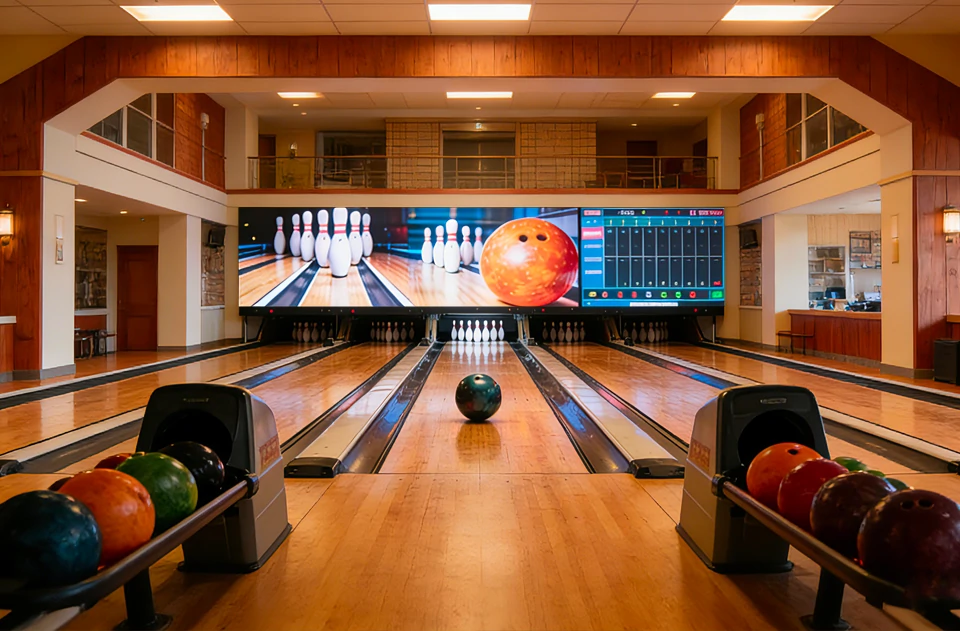
A panoramic LED display creates a shared backdrop across the lanes, alongside separate overhead monitors.
Give The Same Lanes More Possibilities
Different sessions call for different surroundings. Colorful animation can support social bowling, while a calmer visual theme can suit league play. Birthday names, company logos and seasonal artwork let you personalize events using the same display. Reusable templates make these changes easier for your team to manage.
The wall also provides a visible place for short promotions and sponsor graphics. Keep messages large and simple, and repeat them across the display where useful so guests at either end can see them. Your own branding can remain part of the visual experience throughout a session.
A well-planned installation combines that flexibility with comfortable brightness, suitable content and straightforward maintenance. These are the details to settle before choosing the final screen specification.
A Practical LEDCOMS Project Reference
A LEDCOMS project reference for a 12-lane bowling center uses a 21 × 1.75 m P3.91 indoor ultra-slim display. Its panoramic shape provides a continuous canvas for ambient visuals, brand messages and event content.
Project item | Configuration |
Screen dimensions | 21.0 × 1.75 m |
Display area | 36.75 m² |
Pixel pitch | P3.91 |
Cabinet size | 1000 × 250 mm |
Cabinet layout | 21 columns × 7 rows = 147 cabinets |
Maintenance | Front access |
The 1000 × 250 mm cabinet format allows the screen to be built in modular sections. Cabinets are approximately 33 mm deep, helping with space planning behind the lane-end display. Final dimensions and mounting arrangements follow the measured opening and the building structure.
Choose Around Your Venue And Your Content
Screen size and layout
Lane count helps establish the scale, but the available installation width and height determine the design. A clear opening may suit one continuous wall; columns or divided lane groups may call for separate sections. Check sightlines from the outer lanes and seating areas so key messages remain visible.
Pixel pitch
P3.91 is a practical starting point for distant viewing of large graphics and animation, as in this project reference. Consider finer pitches such as P2.976 or P2.5 when viewing positions are closer or smaller text is important. Compare sample content at the intended distance before selecting the specification.
Brightness and panoramic content
Adjust brightness for daytime and evening sessions, checking both the direct view and reflections on the lanes. A 12:1 wall also needs artwork designed for its proportions. Panoramic animation, repeated logos and separate content zones work well; ordinary 16:9 video should appear in correctly proportioned windows rather than being stretched across the full screen.
Plan a Screen Your Team Can Operate Easily
Protect access to the bowling equipment
For a renovation, establish whether existing masking units will remain and how technicians will reach the pinsetters. Front-service LED modules simplify display maintenance, while access to the machinery behind the wall needs to be preserved in the installation design. Confirm mounting, power, cable routes and ventilation with the installation team.
Define the functions you need
Ambient animation, venue branding and promotional videos can run through a suitable playback and LED control system. Scheduled content may require a media player or content-management software. If you want live scores or strike-triggered animations, provide the scoring system name and version so the required integration can be assessed and quoted.
Ask for simple operating presets for everyday play, league sessions and private events. During handover, your team should learn how to start the screen, change a message, adjust brightness and restore playback after a power interruption.
What To Include In Your Quotation
The project price depends on screen area, pixel pitch, mounting conditions, control equipment and installation scope. A useful quotation should identify the display cabinets, controller, support structure, installation work and spare parts, together with any content preparation or software charges. This makes it easier to compare proposals on the same basis.
Also confirm who handles local installation, how replacement parts are supplied and what support is available after delivery. These arrangements matter when the screen becomes part of your daily operation.
Discuss Your Bowling Alley LED Wall With LEDCOMS
Whether you are updating an existing bowling alley or planning a new center, LEDCOMS can discuss a display configuration around your lane layout and content goals. To start, send us:
- Your lane count and whether the screen will cover all lanes or one section.
- A photograph of the lane-end area and the available width and height.
- Your intended content, project location and installation schedule.
- Your scoring system name and version, if interactive functions are required.
Contact info@ledcoms.com to discuss an initial screen layout and quotation.
Explore the LEDCOMS Indoor Ultra Slim LED Display series at ledcoms.com/indoor-ultra-slim/.
A lane-end LED wall gives your bowling center a backdrop you can change for everyday play, private parties and special events. It can carry your branding, promote food and drinks, or turn a row of lanes into a coordinated visual setting. For an owner planning a new venue or renovation, the best choice starts with the space available and what guests will see on the screen.
A panoramic LED display creates a shared backdrop across the lanes, alongside separate overhead monitors.
Give The Same Lanes More Possibilities
Different sessions call for different surroundings. Colorful animation can support social bowling, while a calmer visual theme can suit league play. Birthday names, company logos and seasonal artwork let you personalize events using the same display. Reusable templates make these changes easier for your team to manage.
The wall also provides a visible place for short promotions and sponsor graphics. Keep messages large and simple, and repeat them across the display where useful so guests at either end can see them. Your own branding can remain part of the visual experience throughout a session.
A well-planned installation combines that flexibility with comfortable brightness, suitable content and straightforward maintenance. These are the details to settle before choosing the final screen specification.
A Practical LEDCOMS Project Reference
A LEDCOMS project reference for a 12-lane bowling center uses a 21 × 1.75 m P3.91 indoor ultra-slim display. Its panoramic shape provides a continuous canvas for ambient visuals, brand messages and event content.
Project item | Configuration |
Screen dimensions | 21.0 × 1.75 m |
Display area | 36.75 m² |
Pixel pitch | P3.91 |
Cabinet size | 1000 × 250 mm |
Cabinet layout | 21 columns × 7 rows = 147 cabinets |
Maintenance | Front access |
The 1000 × 250 mm cabinet format allows the screen to be built in modular sections. Cabinets are approximately 33 mm deep, helping with space planning behind the lane-end display. Final dimensions and mounting arrangements follow the measured opening and the building structure.
Choose Around Your Venue And Your Content
Screen size and layout
Lane count helps establish the scale, but the available installation width and height determine the design. A clear opening may suit one continuous wall; columns or divided lane groups may call for separate sections. Check sightlines from the outer lanes and seating areas so key messages remain visible.
Pixel pitch
P3.91 is a practical starting point for distant viewing of large graphics and animation, as in this project reference. Consider finer pitches such as P2.976 or P2.5 when viewing positions are closer or smaller text is important. Compare sample content at the intended distance before selecting the specification.
Brightness and panoramic content
Adjust brightness for daytime and evening sessions, checking both the direct view and reflections on the lanes. A 12:1 wall also needs artwork designed for its proportions. Panoramic animation, repeated logos and separate content zones work well; ordinary 16:9 video should appear in correctly proportioned windows rather than being stretched across the full screen.
Plan a Screen Your Team Can Operate Easily
Protect access to the bowling equipment
For a renovation, establish whether existing masking units will remain and how technicians will reach the pinsetters. Front-service LED modules simplify display maintenance, while access to the machinery behind the wall needs to be preserved in the installation design. Confirm mounting, power, cable routes and ventilation with the installation team.
Define the functions you need
Ambient animation, venue branding and promotional videos can run through a suitable playback and LED control system. Scheduled content may require a media player or content-management software. If you want live scores or strike-triggered animations, provide the scoring system name and version so the required integration can be assessed and quoted.
Ask for simple operating presets for everyday play, league sessions and private events. During handover, your team should learn how to start the screen, change a message, adjust brightness and restore playback after a power interruption.
What To Include In Your Quotation
The project price depends on screen area, pixel pitch, mounting conditions, control equipment and installation scope. A useful quotation should identify the display cabinets, controller, support structure, installation work and spare parts, together with any content preparation or software charges. This makes it easier to compare proposals on the same basis.
Also confirm who handles local installation, how replacement parts are supplied and what support is available after delivery. These arrangements matter when the screen becomes part of your daily operation.
Discuss Your Bowling Alley LED Wall With LEDCOMS
Whether you are updating an existing bowling alley or planning a new center, LEDCOMS can discuss a display configuration around your lane layout and content goals. To start, send us:
- Your lane count and whether the screen will cover all lanes or one section.
- A photograph of the lane-end area and the available width and height.
- Your intended content, project location and installation schedule.
- Your scoring system name and version, if interactive functions are required.
Contact info@ledcoms.com to discuss an initial screen layout and quotation.
Explore the LEDCOMS Indoor Ultra Slim LED Display series at ledcoms.com/indoor-ultra-slim/.


