
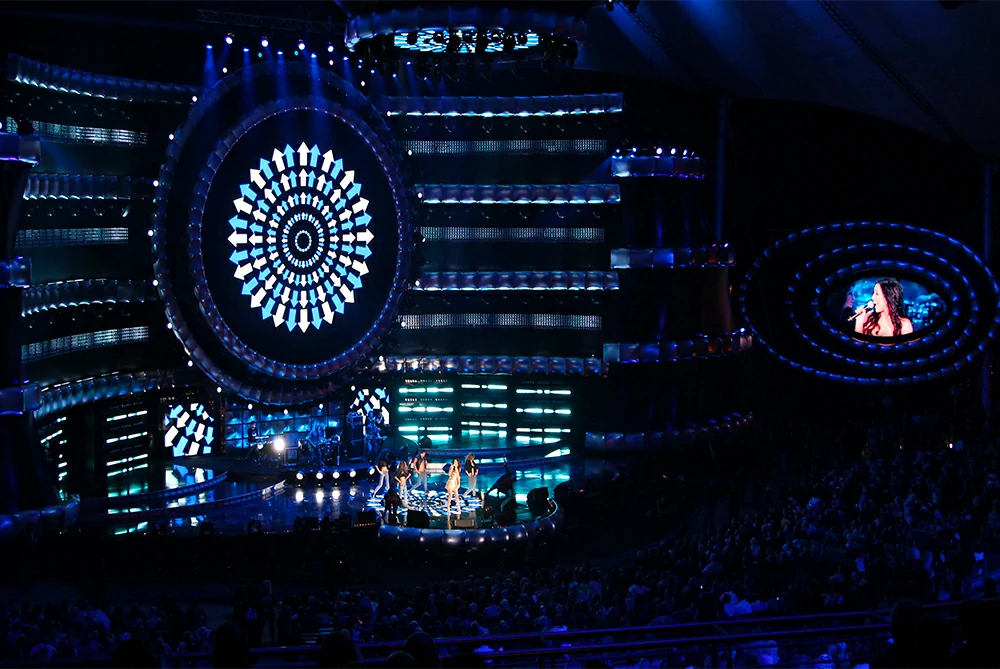
Rental stage LED displays are widely used at concerts, festivals, corporate events, exhibitions, product launches, and live performances. Their modular design makes it possible to build large video walls, curved screens, and custom stage backdrops for different venues.
However, successful operation involves more than assembling cabinets and playing video content. Installation safety, power supply, environmental protection, signal configuration, and image quality all affect the reliability of a rental LED display.
Whether you are an event organizer, rental company, or stage technician, understanding these precautions can help reduce technical problems, protect equipment, and ensure a better viewing experience.
1. Choose the Right LED Display for the Event
The first step is to select a screen that matches the venue, viewing distance, lighting conditions, and content requirements.
Consider pixel pitch
Pixel pitch is the distance between adjacent LED pixels, measured in millimeters. A smaller pixel pitch generally provides sharper images at close viewing distances, making it suitable for indoor conferences, exhibitions, and stages where the audience is near the screen.
Larger pixel pitches may be appropriate for large outdoor stages viewed from farther away. The best choice depends on the audience’s position, screen size, and whether the display will be filmed by cameras.
Match brightness to the environment
Outdoor LED displays need sufficient brightness to remain visible in daylight, while indoor displays usually require lower brightness levels.
Excessive brightness can cause discomfort in dark venues and increase power consumption. Choose a display with adjustable brightness and test it under the actual lighting conditions before the event.
Check the intended application
Live camera footage, presentations, text, and animated backgrounds have different requirements. If the screen will appear in close-up camera shots, refresh performance, grayscale handling, and image uniformity deserve particular attention.
For curved or creative stage designs, confirm that the cabinets support the required shape and installation method.
2. Inspect Cabinets Before Assembly
Rental LED cabinets are repeatedly transported, assembled, dismantled, and reused. Physical damage can affect both image quality and structural safety.
Before installation, inspect each cabinet for damaged corners, loose connectors, bent frames, cracked modules, missing fasteners, and signs of moisture.
Also verify that all cabinets are compatible in terms of pixel pitch, resolution, receiving cards, connectors, and control configuration.
Do not assume that cabinets of similar dimensions can be mixed without checking compatibility. Differences in hardware or configuration may cause incorrect screen mapping, inconsistent colors, or sections that fail to display properly.
Keep compatible spare modules, cables, and other essential components available for repairs.
3. Ensure Safe Installation and Structural Support
Structural safety is one of the most important considerations when using a rental stage LED display. Large screens can weigh hundreds of kilograms, and their support systems must be suitable for the complete installation.
Before assembly, confirm the total load, including LED cabinets, support frames, rigging hardware, cables, and other attached equipment.
For suspended screens, the rigging design, lifting points, and supporting structure should be checked by competent professionals. Use approved hardware and follow the manufacturer’s installation procedures.
Inspect cabinet locks and connection points before lifting or securing the display. Never force misaligned cabinets into place or use damaged locking components.
For outdoor events, consider wind exposure and the screen’s structural stability. Large LED walls can catch substantial wind, so installation limits and reinforcement requirements must be established before the event.
Keep unauthorized people away from lifting areas and elevated work zones. Complete the structural inspection before the display is handed over for operation.
4. Handle and Transport Cabinets Carefully
Poor transportation and handling can damage LED modules, internal connectors, power supplies, and cabinet frames.
Use suitable flight cases and follow the manufacturer’s stacking and handling instructions. Protect the LED surface from impact, scratches, dust, and moisture.
When moving cabinets, use the designated handles or lifting points. Never pull or lift equipment by its cables.
After transportation, inspect the cabinets again before assembly. Even if the equipment worked correctly at the previous event, it may have been damaged during loading, unloading, or transit.
5. Check Power Supply and Electrical Safety
An unstable or incorrectly designed power system can cause flickering, unexpected shutdowns, damaged components, or electrical hazards.
Before installation, calculate the expected electrical load and confirm that the available circuits, distribution equipment, and cables meet the manufacturer’s requirements and applicable regulations.
Do not size the power system using typical consumption alone if it must also support higher operating loads.
Inspect cables and connectors for damage, and ensure that connections are properly secured. Outdoor installations require suitable protection for exposed electrical connections; a weather-resistant LED cabinet does not automatically make every external connector waterproof.
Grounding and electrical protection must follow applicable regulations. Never remove grounding connections or bypass protective devices to eliminate flickering or keep a display running.
If a breaker repeatedly trips, investigate the cause rather than repeatedly resetting it. Electrical faults should be handled by qualified personnel.

6. Protect Outdoor Displays From Weather
Outdoor LED displays may be exposed to rain, dust, humidity, direct sunlight, and changing temperatures. The required protection depends on the cabinet design and the conditions of the installation.
Check the protection rating
Verify the display’s ingress protection rating and the conditions under which it applies. Also check the protection level of cable entries, connectors, distribution boxes, and other external equipment.
A cabinet’s IP rating does not guarantee that the entire installation is waterproof.
Inspect seals and connections
Before an outdoor event, check cabinet seals, access panels, cable entries, and protective covers. Damaged seals or improperly closed panels can allow moisture to enter.
If water is suspected inside the equipment, isolate it according to the prescribed safety procedure and have it inspected before returning it to service.
Prepare for adverse weather
Establish a clear plan for rain, strong winds, and storms. The plan should identify who can authorize a shutdown and what conditions must be met before operation resumes.
Do not use temporary covers that obstruct ventilation or create structural hazards. Follow the manufacturer’s environmental and operating limits.
7. Manage Heat Dissipation
LED modules, power supplies, and control components generate heat during operation. Poor ventilation and high ambient temperatures can reduce reliability and accelerate component aging.
Keep ventilation openings clear and follow the manufacturer’s installation-clearance requirements. Stage walls, curtains, and temporary enclosures should not trap excessive heat behind the display.
Set brightness according to the actual lighting conditions instead of running the screen at maximum brightness unnecessarily.
During long events, monitor the display for abnormal temperatures, warning indicators, or unexpected shutdowns. If overheating occurs repeatedly, investigate the cause rather than continuing operation without inspection.

8. Configure the Control System Correctly
The sending controller, video processor, receiving cards, and playback equipment must be configured to match the physical screen.
Incorrect settings can cause missing sections, distorted images, incorrect colors, or a blank display.
Before the event, verify the screen resolution, cabinet mapping, signal routing, and hardware configuration. Each cabinet should correspond to the correct position in the screen layout.
Use configuration files suitable for the installed hardware. Cabinets that look similar may have different module arrangements or receiving-card settings.
Inspect signal cables and connections, and keep a record of the confirmed working configuration. For complex installations, prepare a clear signal diagram so that technicians can identify the source of a fault quickly.
9. Test Refresh Performance and Camera Compatibility
An LED display may look normal to the audience but show flicker or dark bands when recorded by a camera.
These problems depend on the interaction between display processing, refresh behavior, camera frame rate, shutter settings, and other system parameters.
For concerts, broadcasts, livestreams, and corporate events with live cameras, test the actual camera feed before the show. Review both wide shots and close-ups.
Do not judge camera performance from the refresh-rate specification alone. The complete display configuration must be tested with the intended recording equipment.
Coordinate the LED technician and video team so they can adjust the relevant settings together and confirm the results using recorded footage.
10. Check Brightness, Color Uniformity, and Content
A professional LED wall should display consistent brightness and color across all cabinets.
Before the event, use test patterns to inspect white, red, green, blue, gray, and black content. Look for dead pixels, visible lines, color differences, and uneven brightness between modules.
Calibration may be necessary when cabinets come from different batches or have been used in different configurations.
Content must also match the screen’s actual resolution and aspect ratio. Incorrectly prepared files can produce stretched images, cropped text, black borders, or poor image quality.
Test all videos, presentation slides, transitions, and camera feeds using the actual playback system. Confirm that files play smoothly and that the source output settings match the video processor.
For important events, prepare backup copies of essential content and test them before the show.

11. Complete a Full Pre-Show Test
A display that powers on successfully has not necessarily passed a complete operational test.
Before the audience arrives, inspect the entire screen and run the content that will be used during the event.
The test should cover:
Cabinet connections and physical alignment.
Dead pixels, visible lines, and uneven brightness.
Screen mapping and image positioning.
Signal stability and power distribution.
Brightness, color consistency, and camera performance.
Video playback, transitions, and continuous operation.
Abnormal heat, sounds, warning indicators, or intermittent faults.
Allow enough time for corrections before the event begins. Rushed installation and testing increase the likelihood of problems appearing during a live performance.
For large events, assign a responsible technician to confirm that the display has passed the required checks.
12. Prepare Spare Parts and a Troubleshooting Plan
Even a well-prepared rental LED display may develop a fault. Spare parts and a clear troubleshooting procedure can reduce downtime.
Depending on the equipment and event requirements, useful spares may include compatible LED modules, power supplies, power cables, signal cables, and connectors. Critical events may also require backup control equipment.
Make sure technicians understand the cabinet layout, signal routing, and power distribution system.
If a single cabinet fails, the problem may be local to that cabinet or its connections. If an entire section stops working, a shared power or signal path may be involved. These are diagnostic clues rather than definitive conclusions, so the fault should be investigated systematically.
Never open energized equipment or improvise electrical repairs during a live show. Follow the manufacturer’s isolation procedures and remove unsafe equipment from service.
13. Coordinate With the Stage and Production Teams
LED displays share the stage with lighting rigs, speakers, cameras, trusses, performers, and other equipment. Poor coordination can create blocked sightlines, damaged cables, or access problems.
Confirm that the display is visible from the intended audience areas and that the stage structure does not obstruct important content.
Route cables away from moving equipment, sharp edges, emergency exits, and pedestrian routes. Use suitable cable protection where required.
Test the screen with the actual stage lighting, particularly when it will display text, branding, or close-up camera footage.
The LED technician should coordinate with the stage manager, lighting team, video director, and power technician before the show. Clear communication helps the team respond quickly if a fault occurs.

14. Shut Down, Dismantle, and Store Equipment Properly
Correct dismantling is essential for both worker safety and equipment longevity.
Follow the manufacturer’s shutdown sequence and isolate power as required before disconnecting cables or opening cabinets. Never pull on cables to remove connectors.
For suspended screens, follow the approved rigging sequence and keep the structure stable as components are removed. Do not remove support elements prematurely.
After dismantling, inspect cabinets, modules, cables, and connectors for damage. Record any faults and separate defective components from equipment that is ready for reuse.
Clean and store the equipment according to the manufacturer’s instructions. Avoid excessive moisture, aggressive cleaning chemicals, and methods that could damage LED modules or protective coatings.
Use appropriate flight cases and store cabinets in a clean, dry environment that meets the specified temperature and humidity conditions.
15. Rental Stage LED Display Checklist
Use this checklist to help prepare for the next event.
Before installation
Confirm screen size, pixel pitch, brightness, and viewing distance.
Inspect cabinets and verify hardware compatibility.
Check the structural design, support system, and rigging hardware.
Confirm power requirements and electrical protection.
Review weather conditions and outdoor protection requirements.
Prepare content, configuration files, spare parts, and signal diagrams.
Before the show
Check cabinet alignment and all connections.
Test screen mapping, brightness, color uniformity, and signal stability.
Test the actual content and playback equipment.
Check camera compatibility where applicable.
Confirm the troubleshooting procedure and technical responsibilities.
Complete the required structural and electrical safety checks.
After the event
Shut down and isolate equipment correctly.
Dismantle the display using the approved procedure.
Inspect and record any damage or faults.
Clean and store the cabinets and accessories properly.
Заключение
Using a rental stage LED display safely and reliably requires careful planning at every stage, from equipment selection and transportation to installation, testing, operation, and storage.
The most important precautions are to verify cabinet compatibility, ensure secure structural support, provide suitable power, protect outdoor installations from weather, manage heat, configure the control system correctly, and test the complete display before the audience arrives.
For rental companies, these practices help protect equipment and reduce downtime. For event organizers, they lower the risk of interruptions and support a better viewing experience.
When selecting a rental LED display, consider the complete system rather than focusing only on screen size or brightness. Cabinet quality, image performance, environmental protection, control compatibility, installation requirements, and technical support all contribute to a successful event.
LEDCOMS provides information and display solutions for professional applications, including outdoor LED displays, high-definition LED displays, flexible LED modules, and customized display designs. Visit ЛЕДКОМС to explore display options and discuss the technical requirements of your project.
A reliable rental LED display is not simply a screen that turns on. It is a complete system that has been selected carefully, installed correctly, tested thoroughly, and operated with safety and reliability in mind.


